Quick Answer
Ecommerce site architecture is how your catalog’s pages connect — and it decides how much of your inventory Google actually crawls, indexes, and ranks. In 2027, the formula that works is: a flat structure where every product sits within three clicks of the homepage, disciplined faceted navigation that only lets filter combinations with real search demand be indexed, and clean parameter handling built on canonical tags plus robots.txt. Most ecommerce traffic plateaus are architecture problems wearing a content costume.
Why Architecture Decides Who Wins in 2027
Content gets the credit, but architecture does the plumbing. Four concrete shifts made site structure the binding constraint on ecommerce growth.
1. Catalogs outgrew their crawl paths. A store that launched with 800 SKUs often carries 10,000+ today. Every one of those pages needs to be discovered, crawled, and evaluated. When the architecture can’t keep up, new products sit unindexed for weeks while Google burns crawl activity on filter URLs nobody will ever search for. This is the single most common pattern behind the “we add products but traffic doesn’t move” plateau.
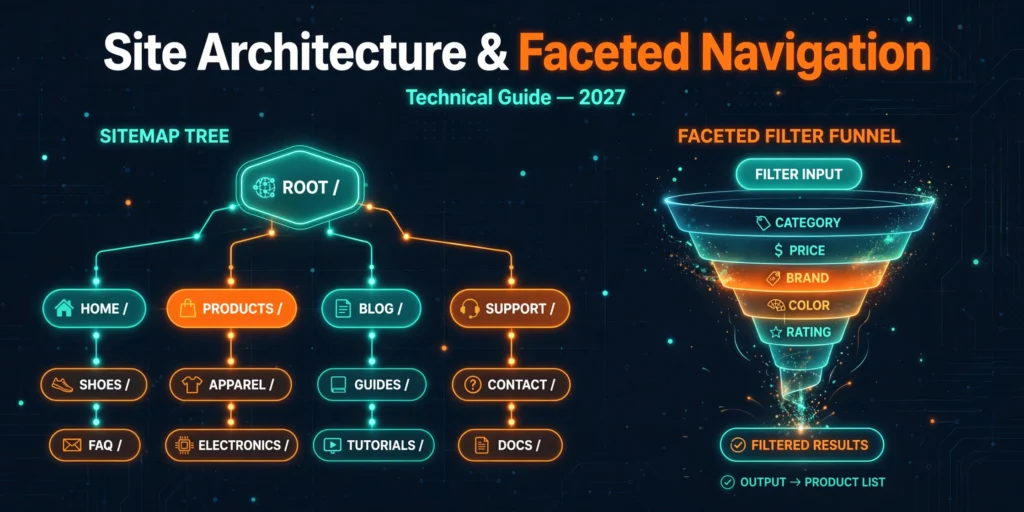
2. Faceted navigation became a URL factory. Color × size × brand × price × rating × sort order — a six-facet filter set can generate millions of unique URLs on autopilot. Google’s faceted navigation guidance is blunt about this: uncontrolled facets waste crawl resources and dilute ranking signals. The stores winning in 2027 treat every indexable facet combination as a deliberate decision, not an accident of the template.
3. The old control levers are gone. Google retired the URL Parameters tool in Search Console in March 2022, and stopped supporting rel=”next”/”prev” as an indexing signal back in 2019. Much published advice still references both — if your playbook does, it’s outdated. The modern approach is canonical tags, robots.txt, and internal linking discipline, covered below.
4. AI surfaces reward clean structure. AI Overviews and AI Mode cite product and category pages that are crawlable, clearly organized, and unambiguous about what they sell — one canonical URL per product, coherent hierarchy, structured data in place. Architecture and AI visibility are the same project now, which is why this connects directly to how AI systems retrieve and cite content.
The through-line: Google doesn’t rank your catalog, it ranks the pages it can efficiently reach and confidently understand. Everything below is about making that easy. For the broader question of how technical work fits alongside content investment, see technical SEO vs content SEO — architecture is the highest-leverage item on the technical side.
The 7-Part Architecture Framework
Seven mechanisms, each following the same structure: why it matters, what to check, what good looks like, and the red flag.
1. Flat vs Deep: Click Depth and Link Equity
Why it matters: Every click away from the homepage dilutes the authority flowing to a page. A product buried six levels deep — Home → Shop → Category → Subcategory → Brand → Product — receives a fraction of the internal link equity of a product three clicks out, and Google crawls deep pages less frequently. On large catalogs this compounds: the products you most want to rank are often the ones the architecture starves.
What to check: Pick twenty revenue-important products and count the clicks from the homepage to each. Then check Search Console’s crawl stats and indexation — deep pages disproportionately land in “Discovered — currently not indexed.”
What a strong answer looks like: “Our top 500 products are all reachable within three clicks via category pages, curated collections, and contextual links from buying guides. Breadcrumb trails mirror the hierarchy on every page.”
Red flag: Products reachable only through the site’s internal search box or through paginated listing pages — invisible to crawlers following links, which is how Google discovers most pages.
2. Crawl Efficiency on Large Catalogs
Why it matters: Google crawls popular, frequently-updated, well-linked pages more; thin, duplicate, or dead-end pages less. On a 10,000-SKU catalog, the question isn’t a fixed “budget” number (Google publishes none for your site specifically); it’s what share of Google’s attention goes to pages that can rank versus pages that can’t. Facet URLs, internal search result pages, expired product URLs, and redirect chains are the usual thieves.
What to check: In Search Console, compare “crawled” URL patterns against “indexed” ones. If a large share of crawls hit parameter URLs, sort URLs, or tag pages while product pages show stale “last crawled” dates, your crawl is being spent in the wrong place. Server logs (if available) give the precise breakdown by URL pattern.
What a strong answer looks like: “Over 80% of Googlebot requests hit canonical product, category, and content URLs. Parameter and sort URLs are blocked at the robots.txt level, and expired products 301 to their parent category instead of 404ing.”
Red flag: “We have 40,000 URLs in Search Console but only 6,000 indexed” — with no plan for which 34,000 shouldn’t exist as crawlable URLs in the first place.
3. Parameter Handling: Canonical Tags Plus Robots.txt
Why it matters: Ecommerce platforms generate parameter URLs constantly:?color=red,?sort=price_asc,?sessionid=,?utm_source=. Left alone, these create duplicate-content sprawl that splits ranking signals across dozens of versions of the same page. With the URL Parameters tool retired, there are exactly two reliable controls left: canonical tags (which consolidate signals) and robots.txt (which stops crawling).
What to check: Crawl a category page with all filters and sorts applied. For each parameter URL, verify: does it carry a canonical tag pointing to the clean version? Are purely functional parameters (sessions, tracking, sorts) disallowed in robots.txt? Google’s canonicalization documentation is the reference for which signal wins when they conflict.
What a strong answer looks like: “Every parameter variant canonicals to the clean category URL; tracking and session parameters are disallowed in robots.txt.”
Red flag: Parameter URLs that are simultaneously blocked in robots.txt AND carry noindex tags — contradictory signals (Google can’t see the noindex if it’s blocked from crawling), or worse, parameter URLs with no canonical at all.
4. Pagination That Doesn’t Leak Equity
Why it matters: Category pages with hundreds of products paginate — /category/page-2, /page-3, and so on. Since Google retired rel=”next”/”prev” support, the wrong pagination setup either orphans deep products or cannibalizes the category page. The two classic failures: canonicalizing every paginated page to page 1 (which tells Google pages 2+ shouldn’t be indexed, stranding their products), or leaving paginated URLs with thin, duplicate content and no internal links pointing deeper.
What to check: View the canonical tag on page 2+ of your main categories. Each paginated URL should be self-canonicalizing (page 2 canonicals to page 2). Usually you want the category root indexed and paginated pages crawlable but not competing.
What a strong answer looks like: “Paginated category pages self-canonicalize. A ‘view all’ option exists for smaller categories. Best-selling products also appear in curated collections linked from the homepage, so no revenue product depends solely on pagination depth for discovery.”
Red flag: Page 2+ canonicalized to page 1 while containing unique products found nowhere else — those products are effectively de-indexed by your own tag.
5. Faceted Navigation: The Index/Noindex Decision Rules
Why it matters: This is where most large catalogs bleed. Facets are excellent for users and dangerous for SEO when every combination becomes a crawlable, indexable URL. The discipline is simple in principle: index only facet combinations that match real search demand, keep the rest crawlable-for-users but invisible to search engines.
What to check: List every facet on the site. For each, ask: do people search for this combination? “Men’s running shoes Nike” — yes, real demand. “Men’s running shoes Nike size 9 red under $100 sorted by newest” — no. The first deserves an indexable URL; the second should be blocked or canonicalized away.
What a strong answer looks like: “Single-facet and high-demand two-facet combinations (brand + category, category + attribute) are indexable with unique titles and intro copy. Three-plus-facet combinations and sort parameters are canonicalized to the parent. Facet URLs use a consistent parameter structure documented in one place.”
Red flag: Thousands of indexed URLs like /shoes?color=red&size=9&brand=nike&price=50-100&sort=newest&page=3 — each competing with your own category page for the same query.
6. Internal Link Equity Flow
Why it matters: Architecture isn’t just hierarchy — it’s the deliberate movement of authority toward the pages that earn revenue. Category pages should link down to subcategories and hero products; product pages should link up via breadcrumbs and sideways to related products and guides. Most stores build the hierarchy, then leave equity distribution to chance.
What to check: Map internal links pointing at your ten highest-margin categories. How many come from the homepage, main nav, footer, and blog content — versus how many those categories have to generate themselves? Then check the reverse: do product pages link anywhere useful, or are they dead ends?
What a strong answer looks like: “Our buying guides link contextually to the three most relevant categories each. Category pages feature bestsellers above the fold with descriptive anchors. Breadcrumbs use the full hierarchy and appear in search results via structured data.”
Red flag: A blog with 200 articles that links to zero product or category pages — content and commerce operating as separate websites that happen to share a domain.
7. Diagnosing the Plateau: The Architecture Audit Order
Why it matters: When traffic flatlines despite new products and content, architecture is the prime suspect. But auditing in the wrong order wastes months — teams rewrite category copy while 40% of products are uncrawled. Run the diagnosis in this sequence, because each step gates the next.
What to check: (1) Indexation coverage — what share of SKUs is actually indexed? (2) Crawl waste — where is Googlebot spending time instead? (3) Click depth of money pages. (4) Parameter and facet sprawl. (5) Pagination and canonical correctness. (6) Internal link distribution. Only after all six check out should the diagnosis move to content quality or authority.
What a strong answer looks like: “We found 62% SKU indexation, traced it to facet-URL crawl waste, blocked three parameter patterns in robots.txt, and indexation rose to 91% within six weeks — before touching a single product description.”
Red flag: An audit that starts with keyword rankings and never once opens Search Console’s Pages indexing report or the crawl stats.
Decision Tables: Parameter Handling and Facet Indexation
Parameter handling: which control for which URL type
| URL type | Correct control | Why |
|---|---|---|
| Tracking/session parameters (?utm_,?sessionid=) | robots.txt disallow | No user or SEO value; pure crawl waste |
| Sort parameters (?sort=price_asc) | Canonical to clean URL | Users share sorted views; no unique search demand |
| Single high-demand facet (?brand=nike on /shoes) | Indexable, unique title + intro copy | Matches real queries like “nike running shoes” |
| Multi-facet combos (3+ filters) | Canonical to parent category | No search demand for the exact combination |
| Internal search result pages (?q=) | robots.txt disallow | Thin, infinite, user-specific — never indexable |
| Paginated series (/page-2, /page-3) | Self-canonical each page | Preserves deep products; avoids page-1 cannibalization |
Facet indexation: the two-question test
| Question | If yes | If no |
|---|---|---|
| Do people search for this exact combination? | Consider indexing — but only with unique titles, intro copy, and enough products to be useful | Keep it crawlable for users; canonicalize or block for search engines |
| Does the page add anything the parent category doesn’t? | Index it and build internal links to it | It’s a duplicate — consolidate its signals into the parent |
A combination needs “yes” to both questions to earn indexation; anything less gets consolidated. Apply this test to every facet and the sprawl resolves into a short, deliberate list.
Common Mistakes That Stall Catalog Growth
- Indexing every filter combination. Millions of near-duplicate URLs compete with your own category pages. Index deliberately or don’t index at all.
- Canonicalizing paginated pages to page 1. Products that exist only on page 3+ get de-indexed by your own tag.
- Products six clicks from the homepage. Deep pages get crawled rarely and rank poorly. Flatten the path with collections, guides, and nav links.
- Orphan product pages. Reachable only via internal search, linked from nothing. If crawlers can’t follow a link to it, it barely exists.
- Conflicting signals on parameters. Blocking a URL in robots.txt while also noindexing it — Google can’t see the noindex through the block. Pick one mechanism per URL type and stick to the table above.
- Trusting the retired URL Parameters tool. It was shut down in March 2022. Any workflow built on it has been silently doing nothing for years.
- Still using rel=”next”/”prev”. Google dropped support in 2019. The tags are harmless but useless — self-canonicalization is the actual mechanism.
- Blog and store as separate islands. Hundreds of articles with zero links to categories or products. Every buying guide should feed its three most relevant categories.
- Letting expired products 404. Dead product URLs that earned links should 301 to the parent category — not evaporate.
- Auditing content before architecture. Rewriting descriptions while 40% of SKUs are uncrawled is decorating a house with no foundation.
When You’re Ready to Move Forward
Architecture work is unglamorous and high-leverage: nothing else — content, links, CRO — compounds until Google can efficiently reach and understand your catalog. One honest expectation on timing: fixes move at Google’s recrawl pace, not yours. Indexation recoveries typically show within weeks; the full ranking benefit builds over months, as our guide to how long SEO takes explains.
If you’d rather have the diagnosis done by someone who’s done it on catalogs at scale — including the RFL Eshop engagement that drove 1.2M+ search impressions and the Wood World category rebuild behind 800% organic growth — Tanveer Evan Rahat runs technical ecommerce SEO audits for stores worldwide, priced in USD for international clients. Start with his ecommerce SEO service page, or request a quote describing your catalog size and platform — the audit follows the framework above, and you’ll know exactly which of the seven mechanisms is holding your growth back.
Frequently Asked Questions
How many products can Google crawl on my store?
There is no fixed number — Google doesn’t publish a per-site crawl budget figure. What matters is efficiency: the share of crawling that reaches indexable, revenue-capable pages. A disciplined 50,000-SKU store gets more useful crawling than a 5,000-SKU store drowning in filter URLs. Fix the waste first.
Should I noindex or canonicalize faceted URLs?
Canonicalize when the facet combination is a variant of an indexable parent (sorts, multi-facet combos) — it consolidates signals. Use robots.txt blocking for URLs that should never be crawled at all (tracking parameters, internal search). Reserve noindex for pages Google should crawl but not index, which is rare in faceted navigation. Never combine robots.txt blocking with noindex on the same URL.
Is the URL Parameters tool in Search Console still available?
No — Google retired it in March 2022. Any guide still recommending it is outdated. The current controls are canonical tags, robots.txt rules, and internal linking discipline, as Google’s faceted navigation documentation describes.
Does rel=”next” and rel=”prev” still work for pagination?
Google stopped using them as indexing signals in 2019. They don’t hurt, but they do nothing. What works: self-canonicalizing paginated URLs, so each page in the series stands on its own without cannibalizing page 1.
How deep is too deep for a product page?
Three clicks from the homepage is the practical ceiling for revenue-important products. Beyond that, crawl frequency and link equity fall off sharply. If a product matters, give it a shorter path — feature it in a collection, link it from a buying guide, or surface it in category merchandising.
How long do site architecture fixes take to show results?
Indexation improvements often appear within two to six weeks as Google recrawls the cleaned structure; ranking and traffic gains from reallocated crawl and equity typically build over two to four months. Large catalogs move slower than small ones. See how long SEO takes in practice for the full timeline breakdown.
Can faceted navigation pages actually rank, or should I always block them?
They can absolutely rank — “brand + category” combinations match real queries with real volume. Be selective: index the combinations people search for, give them unique titles and intro copy, and consolidate everything else. A well-chosen facet page often outranks a generic category page for its specific query.